

Users form impressions quickly, and even small visual inconsistencies in an interface can affect how they experience a product. Visual GUI testing helps in detecting these issues early and maintain a reliable, polished user experience across browsers and devices.
Overview
What Is Visual GUI Testing?
Visual GUI testing (aka visual testing) is a method used to verify how an application’s user interface looks across different browsers, devices, and screen sizes. It helps teams ensure every visual element appears correctly and detect UI regressions early, especially during rapid development cycles.
Key aspects of visual GUI testing:
- Verifying visual elements: Checks the appearance of buttons, icons, text, images, and other components to ensure they display correctly.
- Layout and design consistency: Confirms alignment, spacing, sizing, colors and typography match the intended design.
- Cross-browser and cross-device compatibility: Ensures the interface renders consistently on different browsers, devices and screen sizes.
- Detection of visual regressions: Identifies unintended UI changes by comparing updated screens to baseline images.
- User experience improvement: Helps maintain a clean and predictable interface that supports a better overall user experience.
Methods of Visual GUI Testing:
- Manual Visual Testing: Human testers manually inspecting the UI for visual defects. It works for small interfaces but becomes slow and error-prone as applications scale.
- Automated Visual Testing: Tools automatically capture and compare screenshots to detect visual changes. Faster, more accurate, and ideal for continuous testing in CI/CD pipelines.
This guide will walk you through the essentials of Visual GUI testing, and show you how it works in real projects. It will also highlight the tools and best practices teams rely on to keep their interfaces consistent and reliable.
What Is Visual GUI Testing?
Every testing and development team wants to speed up releases and prevent visual regressions. To achieve this, you must adapt to a professional visual GUI testing strategy to confidently deploy production and seamlessly amend changes across the UI components.
But, what is visual GUI testing?
Visual GUI testing, also known as graphical user interface (GUI) testing, focuses on verifying both the functionality and the appearance of an application’s interface. It does this by capturing screenshots of the GUI at different stages of testing and comparing them with baseline images to spot any visual differences or defects.
What is the role of Visual GUI Testing in QA?
Visual GUI testing tools use computer vision algorithms to analyze the screenshots and detect changes in elements like text, images, colors, and layout. This makes GUI testing especially useful for identifying subtle UI issues that traditional functional tests might miss.
It helps ensure that an application’s interface looks consistent and works as intended across different devices, browsers, and operating systems. It also saves time by automating visual checks and allowing testers to put more effort into complex scenarios.
Visual GUI testing is not a replacement for other testing approaches such as unit testing, integration, or acceptance testing. It works best when used alongside them as part of a complete testing strategy.
Why Is Visual GUI Testing Important?
Visual GUI testing helps to ensure that the application meets visual standards and is aesthetically pleasing.
A well-designed and visually appealing GUI can enhance the overall user experience, making it easier and more enjoyable to use the application.
That’s not it.
Here are several reasons why visual GUI testing is highly important for your software:
- Visual GUI testing provides a clear and concise representation of the user interface, making it easier for designers, developers, and stakeholders to understand and collaborate on the design and functionality of the product.
- It helps to ensure that the appearance and behavior of the GUI are consistent across different operating systems, browsers, and devices.
- Visual GUI testing verifies that all the graphical elements are functioning properly, and that users can interact with the application as expected.
But functional testing also focuses on verifying that the application behaves as expected and that it meets its functional requirements, so why use visual GUI testing at all?
While functional testing can help identify issues with the way the application is supposed to work, it does not guarantee that the visual elements of the application are correct.
Visual bugs and issues such as incorrect layout and color schemes, misaligned elements, and inconsistent font sizes can all impact the overall user experience of an application. These issues cannot be identified through functional testing alone, as functional tests only validate the underlying code and not the visual representation of the application.
So, visual GUI testing is specifically designed to detect these types of issues and to ensure that the application is visually appealing and easy to use.
Apart from checking the visual appeal of an application, visual GUI testing has multiple other advantages.
Read more: Is Visual Comparison Testing the Future?
Advantages of Visual GUI Testing
By incorporating visual GUI testing into the software development process, you can improve the overall quality of your applications and provide a better user experience for your users. Here are a few important benefits it offers:
- Visual GUI testing can help identify visual issues early in the development process. This makes it easier and less costly to fix any issues and can help improve the overall quality of the application.
- Automated visual GUI testing tools can perform repetitive and time-consuming testing tasks more quickly and accurately than manual testers.
- By performing thorough visual GUI testing, you can reduce the risk of user frustration or abandonment due to visual issues, such as incorrect layout, misaligned text, or incorrect colors.
Apart from these advantages, you can use different types of visual GUI testing for unlocking multiple other benefits.
Read more: How to select the right Visual Testing Tool
Types of Visual GUI Testing
There are several types of visual GUI testing that can be performed to verify the visual aspects of a graphical user interface (GUI). Based on your requirements, you can use a specific type to achieve your desired testing results.
- Layout Testing: It focuses on verifying the layout and positioning of GUI elements, such as buttons, text fields, and menus. It ensures that the elements are positioned correctly and that the layout is visually appealing and easy to use.
- Compatibility Testing: If you want to verify that the GUI elements display and function correctly on different operating systems, browsers, and devices, you can use compatibility testing. It helps to ensure that the application is accessible to a wide range of users and that the visual aspects of the GUI are consistent across different platforms.
- Usability Testing: This type of testing focuses on verifying that the GUI elements are usable and that users can interact with the application as expected. It verifies that buttons, menus, and other GUI elements are functioning correctly and that users can navigate the application easily and efficiently.
- Visual Design Testing: This type of testing focuses on verifying that the visual design of the application is aesthetically pleasing and meets the visual standards set by the development team. This includes testing the colors, fonts, and overall visual style of the application.
- Accessibility Testing: This type of testing focuses on verifying that the application is accessible to users who are differently abled (such as visual impairments, motor impairments, or cognitive impairments.) It ensures that the application meets accessibility standards and works as expected.
But while performing specific visual GUI testing, you must follow a few standard practices for better results.
Best Practices for Visual GUI Testing
There are several best practices that can help ensure effective and efficient visual GUI testing and we have filtered the important ones for you:
- Visual GUI testing should be performed on multiple operating systems, browsers, and devices to ensure that the visual elements display and function correctly across different platforms. You can use BrowserStack’s cloud selenium grid of 3500+ real browsers and devices for testing apps and script automation cases without worrying about updating and buying devices and installing software.
- Developing and using standard test cases can help ensure that visual GUI testing is performed consistently and that all critical elements are tested.
- Documenting issues that are found during visual GUI testing and tracking them to resolution helps to ensure that all issues are addressed and that the overall quality of the application is improved.
- Involving designers and users in visual GUI testing can help ensure that the visual elements of the application meet the expectations of both groups.
- Regularly reviewing and updating test cases can help ensure that visual GUI testing remains relevant and that the most critical elements are being tested.
While following these best practices during visual GUI testing, you can face different challenges.
Read more: Strategies to Optimize Visual Testing
Common Challenges in Visual GUI Testing
There are several common challenges that can arise during visual GUI testing. Once you know about the challenges you can face, it can help you prepare better.
- Automating visual GUI testing can be challenging, as it requires specialized tools and techniques. It also requires more time and resources to set up and maintain than manual testing.
- Testing the visual elements of a graphical user interface across multiple operating systems, browsers, and devices can be time-consuming and difficult.
- Maintaining test cases that are used for visual GUI testing can be challenging, as the application may change over time and new issues may arise.
- Addressing issues that are found during visual GUI testing can be challenging, as the cause of the issue may be complex and require changes to the application’s design or code.
- Managing test data can be a challenge during visual GUI testing, as it requires the ability to create, store, and use test data effectively.
Addressing these challenges and incorporating best practices into the visual GUI testing process can help organizations to ensure that their applications have a high-quality graphical user interface that meets the expectations of both designers and users.
You can also use different automation tools for empowering your visual GUI testing results.
Top 7 Tools for Visual GUI Testing
Incorporating tools into the software development process, organizations can ensure that the visual elements of their graphical user interfaces are functioning correctly and meet the expectations of both designers and users. Here are the best ones you can use:
1. Selenium: It is an open-source suite of tools that can be used for automating visual GUI testing. BrowserStack provides a cloud selenium grid of 3500+ real browsers and devices for automated end-to-end testing of web applications.
2. Percy visual testing: Integrate Percy visual engine into your software development life cycle and review changes with every commit. Percy is an all-in-one visual review platform designed to help teams streamline their web development workflow by providing a comprehensive solution for visual testing, review, and collaboration.
The platform allows teams to easily capture visual snapshots of their web application or website as they make changes and compare those snapshots to previous versions to identify any unexpected visual changes or errors quickly. This can help teams catch issues early on before they become larger and more difficult to fix.

Read more about how Percy helped Canva.
Percy also provides a range of collaboration and communication tools, making it easy for team members to share feedback and discuss changes in real time. This can help teams work together more effectively and ensure that everyone is on the same page throughout the development process.
Overall, Percy aims to simplify the web development process by providing a powerful and user-friendly platform for visual testing and review, helping teams to improve the quality of their web applications and websites while saving time and effort.
3. Appium: Appium is an open-source GUI testing framework for mobile applications, supporting both Android and iOS platforms.
4. Cypress: It is an open-source testing tool for web applications that provides an all-in-one testing solution, including GUI testing.
5. Robot Framework: Robot Framework is a generic open-source testing framework that supports a wide range of applications, including web, desktop, and mobile.
6. WebDriverIO: Being in the industry for a long time, WebdriverIO is similar to Selenium with JavaScript because it uses Selenium libraries internally.
7. TestCafe: It is an NodeJS-based framework that supports typescript/javascript out of the box. Being an open-source framework, you can install and run your scripts within a few commands.
These tools can help to automate and streamline the process of visual GUI testing, making it faster and more efficient.
But you must know different metrics which can help you analyze the effectiveness of your visual GUI testing results using these automated tools.
Key Metrics for Evaluating Visual GUI Testing
Here are some key metrics that you can use for analyzing your visual GUI testing process:
- Test coverage: The test coverage measures the percentage of the application’s visual elements that have been tested. A high test coverage indicates that a large portion of the application’s visual elements has been tested, reducing the risk of visual issues going unnoticed. Learn test coverage techniques.
- Defect density: Defect density measures the number of visual issues found per unit of code or visual element. A low defect density indicates that few visual issues are being found, suggesting that the visual GUI testing process is effective.
- Time to resolution: The time to resolution metric measures the amount of time it takes to address visual issues that are found during testing. A low time to resolution indicates that visual issues are being addressed quickly, reducing the risk of additional issues arising from unresolved visual issues.
- Test failure rate: It measures the percentage of visual GUI tests that are failing. A low test failure rate indicates that few visual issues are being found, suggesting that the visual GUI testing process is effective.
- Test pass rate: It measures the percentage of visual GUI tests that are passing. A high test pass rate indicates that the visual elements of the application are functioning correctly and meeting the expectations of both designers and users.
By regularly monitoring these metrics, you can evaluate the effectiveness of their visual GUI testing process and make improvements as needed to ensure that their applications have a high-quality graphical user interface.
Must read: How to perform storybook visual testing?
Why Teams Trust Percy for Visual GUI Testing
Percy by BrowserStack is an AI-powered visual testing platform designed to automate visual regression testing for web applications. It helps teams maintain consistent user interfaces on every code commit by identifying changes that affect how a page looks and behaves.
Integrated into CI/CD pipelines, Percy detects layout shifts, styling issues, and content changes with advanced AI. This capability reduces false positives and shortens review cycles, which results in faster and more confident releases.
- Effortless Visual Regression Testing: Integrates into CI/CD pipelines with a single line of code and works with functional test suites, Storybook, and Figma for shift-left testing.
- Automated Visual Regression: Captures screenshots on every commit, compares them against baselines side by side, and flags visual regressions such as broken layouts, style shifts, or component issues.
- Visual AI Engine: Uses advanced algorithms and AI Agents to ignore visual noise from dynamic banners, animations, anti-aliasing, and other unstable elements. It focuses on meaningful changes that impact user experience. Features such as “Intelli ignore” and OCR help separate important visual shifts from minor pixel-level differences and reduce false positives.
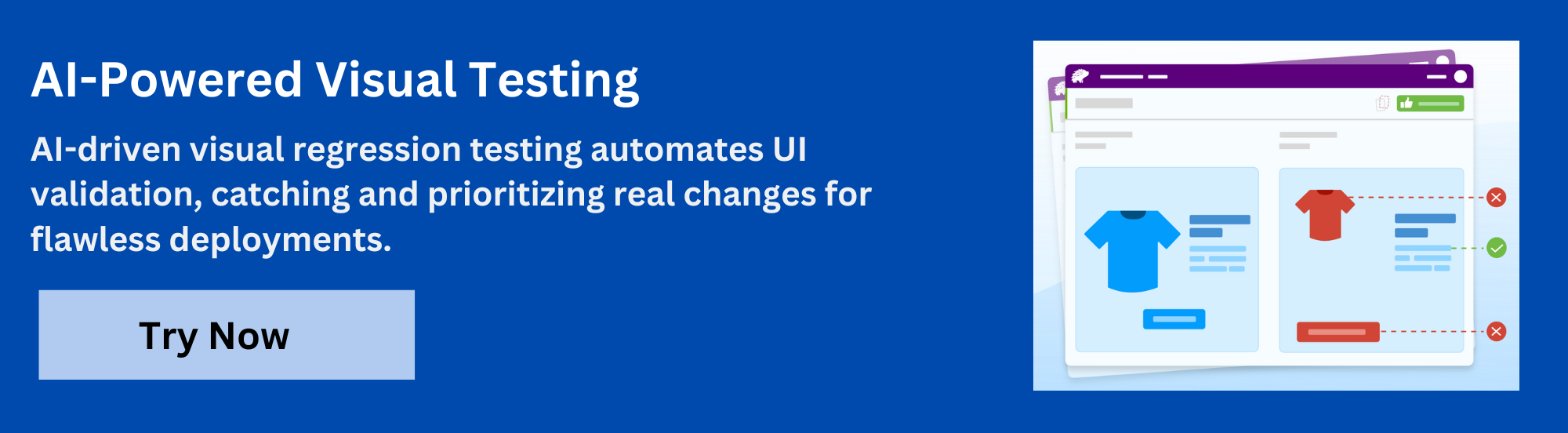
- Visual Review Agent: Highlights significant changes with bounding boxes, provides human-readable summaries, and speeds up review workflows by up to 3x.
- No-Code Visual Monitoring: Visual Scanner offers a quick setup that requires no installation. It can scan and monitor thousands of URLs across more than 3500 browsers and devices. It triggers scans on demand or on a schedule, ignores dynamic content regions, and compares staging and production environments instantly.
- Flexible and Comprehensive Monitoring: Allows scheduling of scans hourly, daily, weekly, or monthly. It supports analysis of historical results, comparison of any environment, local testing, authenticated pages, and early detection of bugs before public release.
- Broad Integrations: Supports major frameworks and CI tools and provides SDKs for quick onboarding and scalable adoption.
App Percy is BrowserStack’s AI-powered visual testing platform for native mobile apps on iOS and Android. It runs tests on real devices in the cloud to ensure accurate UI rendering, while AI-driven handling of dynamic elements helps reduce flaky tests and false positives.
With easy plug-and-play integration that requires only one line of code, App Percy supports frameworks such as Appium, WebdriverIO, Java, and Python. Scalable parallel execution speeds up build times by up to 10x, and a unified dashboard provides logs, screenshots, video recordings, and compliance with essential data privacy standards.
Pricing Details of Percy
- Free Plan: Available with up to 5,000 screenshots per month and suitable for small projects or initial evaluation.
- Paid Plan: Starts at $199 and includes advanced features, with custom pricing available for enterprise needs.
Future of Visual GUI Testing
The future of visual GUI testing will continue to evolve as artificial intelligence and machine learning advance. These capabilities are improving the speed and accuracy of visual checks by identifying issues related to alignment, spacing, color contrast, and typography that manual reviews often miss. Automated visual testing is also becoming more dependable, which helps teams reduce repetitive work and focus on more complex testing tasks.
Teams can combine functional tests with automated visual checks by integrating Percy into their CI/CD pipelines. This setup makes it easier to detect visual regressions across different environments. Percy supports common CI platforms such as Jenkins, GitLab CI, Travis CI, CircleCI, and Semaphore.
Conclusion
Visual GUI testing is now an integral part of delivering reliable and consistent user interfaces. It not only allows teams to catch visual issues early, maintain design accuracy, but also ensure that UI changes behave as expected across browsers and devices.
When combined with functional, unit, and integration testing, it supports a more complete and dependable testing strategy. As tools and automation continue to advance, one can adopt visual testing more easily and keep pace with faster release cycles.
Useful Resources for Visual Testing
- How to capture Lazy Loading Images for Visual Regression Testing in Cypress
- How to Perform Visual Testing for Components in Cypress
- How to run your first Visual Test with Cypress
- How Visual Diff Algorithm improves Visual Testing
- How is Visual Test Automation changing the Software Development Landscape?
- How does Visual Testing help Teams deploy faster?
- How to perform Visual Testing for React Apps
- How to Run Visual Tests with Selenium: Tutorial
- How to reduce False Positives in Visual Testing?
- How to capture Lazy Loading Images for Visual Regression Testing in Puppeteer
- How to migrate your Visual Testing Project to Percy CLI
- Why is Visual Testing Essential for Enterprises?
- Importance of Screenshot Stabilization in Visual Testing
- Strategies to Optimize Visual Testing
- Best Practices for Visual Testing
- Visual Testing Definitions You Should Know
- Visual Testing To Optimize eCommerce Conversions
- Automate Visual Tests on Browsers without Web Drivers
- Appium Visual Testing: The Essential Guide
- Top 17 Visual Testing Tools
Frequently Asked Questions
1. How do I get started with visual GUI testing?
Teams can begin by identifying key user flows and UI states to capture as baselines. Once baselines are established, visual testing tools can be integrated into existing test suites or CI/CD pipelines to automate screenshot capture, comparison, and review. Clear testing criteria and consistent environments help maintain reliable results.
2. How do I handle dynamic UI elements during visual testing?
Dynamic elements such as ads, rotating banners, timestamps, and animations can introduce noise into comparisons. Tools that support ignoring specific regions, stabilizing dynamic content, or using AI to filter out non-essential differences help maintain accurate and meaningful visual checks.
3. How often should visual tests run in CI/CD?
Running visual tests on every commit provides the earliest detection of regressions. For larger suites or resource-heavy jobs, teams may run full visual tests on pull requests or nightly builds, while keeping critical paths enabled for every merge. The goal is consistent visibility into UI changes throughout the development cycle.
 Featured Article


