

Maven is a popular build automation and project management tool that simplifies compiling, packaging, and deploying applications.
Overview
Maven plays a key role in DevOps by managing dependencies, ensuring consistent builds, and integrating seamlessly with CI/CD pipelines.
Use Cases of Maven in DevOps:
- Dependency Management: Automatically handles project libraries and versioning.
- Standardized Builds: Ensures consistent build processes across environments.
- CI/CD Integration: Works seamlessly with Jenkins, GitHub Actions, and other pipelines.
- Automated Testing: Integrates unit and integration tests during the build lifecycle.
- Project Management: Provides a structured project layout with reusable configurations.
- Artifact Management: Publishes and manages build artifacts in repositories like Nexus or Artifactory.
This article explores Maven in detail, covering its purpose, architecture, key features, practical use cases, and the value it brings to DevOps environments.
What is Maven?
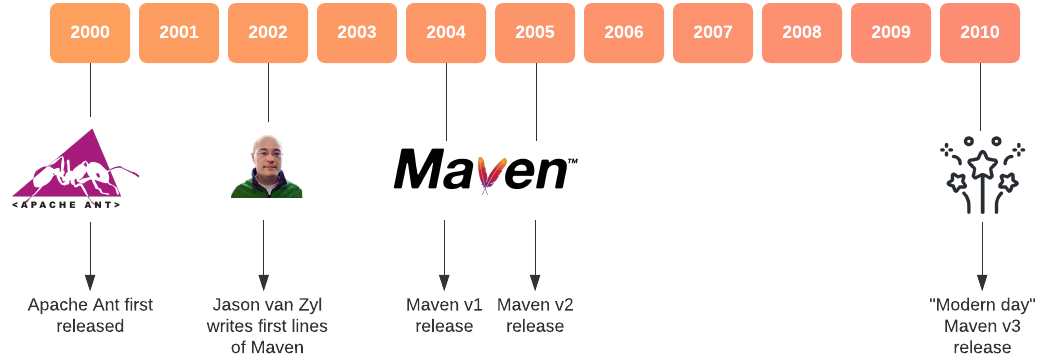
In the Yiddish language, Maven means “collector/ accumulator of knowledge.” It was initially launched on 13 July 2004.
Maven vs Gradle Comparison
Maven is one of the popular open-source build tools developed by the Apache Group for building, publishing, and deploying multiple projects for perfect project management. Maven provides software developers build & document the SDLC framework. It is mainly written in Java and is used to build projects written in Scala, C#, Python, Ruby, etc.
Based on the POM (Project Object Model), this tool has made the lives of Java developers stress-free while developing reports, scrutinizing builds, and testing automation set-ups.
Maven in DevOps emphasizes the standardization and simplification of the building procedure, taking care of the following:
- Builds
- Dependencies
- Documentation
- SCMs
- Distribution
- Mailing list
- Reports
- Releases
Also Read: DevOps Vs SysOps
The Need for Maven
Maven simplifies the management of Java-based applications by organizing projects, handling build scripts, executing compiler tools, and managing versions of compiled code. It also provides powerful dependency management, allowing projects to reference specific versions of other projects with ease.
With Maven, developers can:
- Build Projects Efficiently: Automate the entire build lifecycle from compilation to deployment.
- Manage Source Code: Accumulate and structure source code systematically.
- Run Tests: Execute unit and functional tests as part of the build process.
- Package Applications: Create distributable formats like WAR, JAR, or RPM files.
- Upload Artifacts: Publish build outputs to remote repositories such as Nexus or Artifactory.
- Handle Dependencies: Effortlessly add JARs and other project dependencies.
- Generate Reports: Access useful project information like dependency lists, test reports, and logs.
- Integrate with Source Control: Connect seamlessly with version control systems like Git or Subversion.
By combining these capabilities, Maven not only streamlines the build process but also ensures consistency, scalability, and maintainability across development teams.
Read More: A Complete Guide on Maven Lifecycle
Maven Architecture
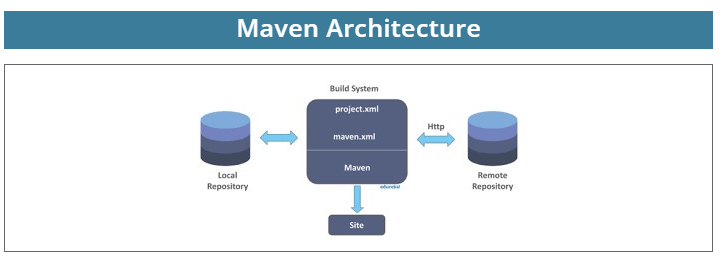
In the above figure, these are the many components of Maven architecture. This is the local machine’s local repository that you function on. This is the central repository and this is the remote web server or the remote repository, so when you specify any dependency in the palm.XML file of Maven. Maven will seek the file in the central repository.
If the dependence exists in the central repository Maven will copy that dependence onto your local machine, however, if it isn’t present here Maven will get it from the remote repository via the internet, so the internet is mandatory for making use of Maven this is how Maven architecture functions.
The Maven build follows a particular life cycle to deploy & distribute the target project.
There are three build life cycles::
- default: the main life cycle as it is responsible for project delivery
- clean: to clean the project & remove all files made by the previous build
- site: to generate the project’s website documentation
Key Features of Maven
Maven comes with a wide range of features that make it a powerful tool for project management and build automation. Its ability to simplify complex tasks while ensuring consistency makes it highly valuable in modern development and DevOps practices.
Key features include:
- Dependency Management: Automatically downloads and manages required libraries, ensuring compatibility and reducing conflicts.
- Standardized Project Structure: Provides a predefined directory layout, making it easier to maintain and scale projects.
- Build Automation: Handles compiling, packaging, testing, and deploying applications with minimal manual effort.
- Plugin Support: Offers a rich ecosystem of plugins to extend functionality, from code analysis to deployment.
- Multi-Module Project Support: Enables managing multiple related projects within a single build.
- Integration with CI/CD: Works seamlessly with tools like Jenkins, GitLab, and Bamboo for automated pipelines.
- Extensive Reporting: Generates reports for dependencies, test results, and build status to improve visibility.
- Repository Support: Publishes and retrieves artifacts from local, central, or remote repositories like Nexus or Artifactory.
These features make Maven a complete solution for managing builds, ensuring consistency, and enabling automation across the software development lifecycle.
Read More: What is POM in Maven
How can Maven benefit DevOps?
Maven simplifies the process of creating and managing Java-based projects by providing a structured approach to building, packaging, and maintaining applications. New features or dependencies can be easily integrated through Maven’s configuration, reducing manual effort and errors.
One of Maven’s core strengths is its ability to automatically manage project dependencies, ensuring that all required libraries are downloaded and version conflicts are resolved without hassle. This makes development faster, more reliable, and highly scalable in DevOps environments.
Popular IDEs supporting Maven integration include:
- NetBeans: Provides built-in Maven support for seamless project creation and management.
- Eclipse: Offers plugins like m2e for easy Maven integration and dependency handling.
- MyEclipse: Extends Eclipse with advanced enterprise development features and Maven support.
- JBuilder: Integrates Maven for Java development with additional productivity tools.
- IntelliJ IDEA: Delivers robust Maven integration with smart code assistance and automation.
Processes that can be managed using Maven include:
- Building: Automates compilation, packaging, and deployment of applications.
- Documenting: Generates project documentation directly from source code.
- Reporting: Produces reports for dependencies, test results, and project health.
- Dependencies: Resolves and manages external libraries automatically.
- SCMs: Integrates with Source Control Management tools like Git or Subversion.
- Launches: Handles application launches and execution tasks.
- Distribution: Packages and distributes build artifacts to repositories.
- Mailing Lists: Manages communication lists for project collaboration.
By automating these processes, Maven enhances project performance, streamlines builds, and strengthens DevOps pipelines with consistency and efficiency.
Conclusion
Maven is a powerful tool that streamlines project management, automates builds, and handles dependencies with ease. By offering standardized project structures, seamless integration with IDEs, and strong support for CI/CD pipelines, it plays a vital role in accelerating DevOps workflows.
From managing builds to generating reports and distributing artifacts, Maven ensures consistency, reliability, and efficiency across the software development lifecycle.
To complement this, BrowserStack Automate integrates seamlessly into CI/CD pipelines, enabling automated cross-browser testing on 3500+ real browsers and devices. With features like parallel test execution, deep debugging insights, and zero infrastructure setup, it ensures that applications managed and built with Maven are validated in real-user conditions.
Together, Maven and BrowserStack Automate empower DevOps teams to deliver reliable, high-quality software at speed.
 Featured Article


