RemoteWebDriver in Selenium is an extension of the WebDriver interface that lets testers run automated test cases on remote machines. It is widely used for executing tests across different browsers, operating systems, and environments using Selenium Grid.
Overview
1. What is Selenium RemoteWebDriver and Its Architecture?
- RemoteWebDriver implements the WebDriver interface to execute scripts on remote machines.
- Works on a client-server model:
- Client libraries send test requests as JSON.
- Server forwards them to browser drivers like ChromeDriver or GeckoDriver.
- Useful for running distributed tests across multiple environments.
2. Advantages of Using Selenium RemoteWebDriver for Testing
- Enables parallel execution across multiple machines.
- OS-agnostic: run tests on browsers unavailable locally.
- Supports local testing of staging websites before going live.
- Returns exceptions with screenshots for faster debugging.
3. How to Install and Run RemoteWebDriver in Selenium Grid
- Start Selenium server hub: java -jar selenium-server-standalone.jar -role hub
- Register a node to the hub and access via Grid Console.
- Write test scripts pointing RemoteWebDriver to the hub URL.
- Add desired capabilities (browser, version, OS) to configure tests.
4. Comparing Selenium RemoteWebDriver vs WebDriver for Test Execution
- RemoteWebDriver: For cross-browser, cross-OS testing on remote machines via Grid.
- WebDriver: For direct, local browser automation.
- RemoteWebDriver includes extra methods for distributed environments, while WebDriver is simpler for local runs.
This article explains what Selenium RemoteWebDriver is, its architecture, benefits, installation steps with examples, and how it compares with WebDriver for different testing needs.
What is a Selenium RemoteWebDriver?
The RemoteWebDriver class implements the WebDriver interface to execute test scripts through the RemoteWebDriver server on a remote machine. This class is implemented under the package below:
java.lang.Object
org.openqa.selenium.remote.RemoteWebDriver
Remote WebDriver Architecture
- Remote WebDriver consists of a server and a client.
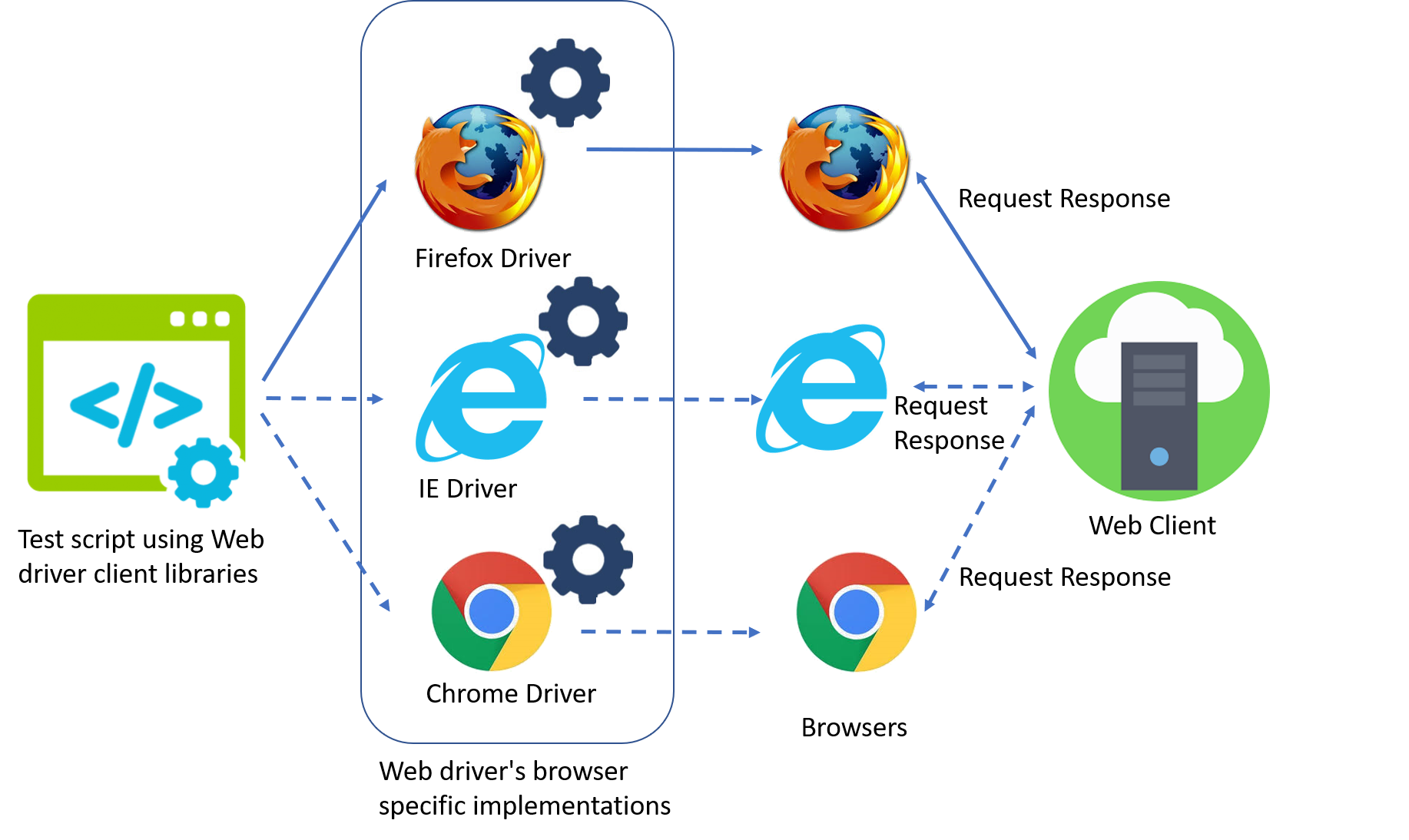
- The server is a component that listens on a port for various requests from a Remote WebDriver client. Once the request is received, it forwards the request to the browser driver: FirefoxDriver, IEDriver, or ChromeDriver.
- The client libraries serve as a Remote WebDriver client. The client translates test script requests to JSON payload and sends it across to the Remote WebDriver server using the JSON wire protocol. The diagram below depicts the Remote WebDriver architecture.

- When test cases are executed, the WebDriver client libraries link with the browser drivers directly. On the other hand, if one tries to execute tests remotely, the WebDriver client libraries communicate with the Remote WebDriver server. Then, the server links to either of the browser drivers that the WebDriver client requests for.
Advantages of Selenium RemoteWebDriver
- It allows for the execution of Automation test suites or batches on multiple machines at the same time
- It enables test case execution with browsers that are not available on the current OS. In simple terms, it is OS-independent.
- It returns an exception with an accompanying screenshot so testers know what issue has occurred.
- It allows testing of a web application on a remote server, even before making it live. Hence, local testing saves time and cost with early bug detection.
Pro-Tip: With BrowserStack Local, you can test your staging website on 3000+ real devices and browsers even before making it live, to ensure a seamless user experience.
When to use Selenium RemoteWebDriver?
Selenium Remote WebDriver can be used when you need to test your website in the local environment. It helps QAs test staging websites before launch and enables them to debug any issues before customers experience them.
Test Local Websites on Real Device Cloud
Selenium RemoteWebDriver Installation
The setup process here is simple. But, it requires the user to be aware of the Selenium Grid and its installation. To understand the setup process in detail, refer to our Selenium Grid Tutorial.
Once the Selenium grid is installed, follow the steps below to configure the Selenium RemoteWebdriver.
- Start the server on the command prompt using the command:
java -jar selenium-server-standalone-3.3.1.jar -role hub
The hub should now be running on localhost port 4444
- Open another command prompt to add a node to the hub:
java -jar selenium-server-standalone-3.3.1.jar -role node -hub http://localhost:4444/grid/register
- Open a web browser and navigate to http://localhost:4444/grid/console. The grid console page will be visible. Connect to Selenium Hub to execute test cases.
To know the various modifiers of RemoteWebDriver class, refer to this document.
Run Selenium RemoteWebDriver with help of an example
When the Selenium server and hub are connected and running, you can write a test case using RemoteWebDriver.
- To run a remote WebDriver client, first, connect to RemoteWebDriver. Point the URL to the address of the server running the tests. Also, set up the desired capabilities to customize the client. The example below instantiates a remote WebDriver object pointing to the remote web server, www.myexamplebrowserstack.com.
FirefoxOptions firefoxOptions = new FirefoxOptions();
WebDriver driver = new RemoteWebDriver(new URL("http://www.myexamplebrowserstack.com"), firefoxOptions);
driver.get("http://www.google.com");
driver.quit();- Next, add the desired capabilities to customize the configuration. The RemoteWebDriver runs on JSON wireless protocol. Hence it becomes necessary to add desired capabilities and execute the test on Chrome browser and windows platform.
ChromeOptions chromeOptions = new ChromeOptions();
chromeOptions.setCapability("browserVersion", "74");
chromeOptions.setCapability("platformName", "Windows 10");
WebDriver driver = new RemoteWebDriver(new URL("http://www.myexamplebrowserstack.com"), chromeOptions);
driver.get("http://www.google.com");
driver.quit();
- The next step is to transfer the files from the client machine to the remote server. This can be achieved using the Local file detector. The RemoteWebDriver transfers the files from the client to the remote server. The command below helps to set the file detector.
driver.setFileDetector(new LocalFileDetector());
- Finally, the file can be uploaded to execute the test cases
driver.get("Path of the file");
WebElement uploadfile = driver.findElement(By.id("myfile"));
uploadfile.sendKeys("File_path_value");
Selenium RemoteWebDriver vs Selenium WebDriver: When to use which
Here are the core differences between Selenium RemoteWebDriver and WebDriver –
| Selenium RemoteWebDriver | Selenium WebDriver |
|---|---|
| It implements a WebDriver interface | WebDriver object is a browser |
| Controls the desired browser in the node PC over Grid | WebDriver object controls the web browser |
| RemoteWebDriver object instantiation controls any browser in the node PC which is on Windows, Mac, Linux, etc. platforms. | On instantiating the driver object, class implementations will be launched |
| Contains additional methods for the class implementation | Comprises of fewer methods for implementing interfaces |


 Featured Article



