Continuous Integration (CI), Continuous Delivery (CD), and Continuous Deployment (CD) are often mentioned together, but they solve different parts of the software delivery.
Understanding how these practices differ—and how they complement one another—helps teams avoid bottlenecks, reduce release failures, and build a pipeline that moves code from commit to production with far more reliability.
Overview
Continuous Integration (CI) vs Continuous Delivery (CD) vs Continuous Deployment (CD)
- Continuous Integration (CI): Focuses on merging code safely and catching issues early through automated builds and tests.
- Continuous Delivery (CD): Packages and stages every tested build so it’s always ready for manual deployment.
- Continuous Deployment (CD): Takes delivery further by automatically deploying every validated change to production.
In this article, I’ll break down the practical difference between CI vs CD and show how separating the two leads to clearer workflows, faster feedback loops, and more dependable releases.
What is DevOps?
DevOps, which stands for development and operations, is a collaborative practice that aims to eliminate the divide between development and operations teams inside a business. When businesses use DevOps technologies and best practices, they receive a more streamlined, agile approach to software development, which enables their teams to automate processes and integrate new modifications and features more rapidly, hence accelerating delivery.
A DevOps example would be the rapid and efficient deployment of code on a cloud platform. It’s a continuous process; rather than one major upgrade every few months or years, smaller, incremental updates are released continuously. This helps developers to build, test, and deploy updates or releases without compromising the infrastructure’s stability.
Continuous Integration vs Continuous Delivery (CI vs CD)
Before we proceed with understanding what is Continuous Integration and Continuous Delivery and how is it different from continuous deployment, let us first look at the high level difference between CI vs CD.
| Category | Continuous Integration (CI) | Continuous Delivery (CD) |
|---|---|---|
| Core purpose | Detect issues early during development | Ensure software is always ready for release |
| Primary question it answers | Does this code change break anything? | Is this build ready for real users? |
| When it runs | On every code commit or pull request | After CI passes successfully |
| Scope | Code quality and build stability | End-to-end release confidence |
| Types of tests | Unit tests, basic integration tests | UI, end-to-end, regression, acceptance tests |
| Test environments | Local, containers, or synthetic environments | Staging or production-like environments |
| Feedback speed | Very fast (minutes) | Slower but more comprehensive |
| Risk addressed | Broken builds, faulty logic | User-facing defects and release failures |
| Impact of failure | Developer fixes code before merge | Release is blocked until issues are resolved |
What is Continuous Integration (CI)
Continuous Integration (CI) is the development practice of merging code changes into a shared repository multiple times a day, where every commit is automatically built and tested. The goal is to detect integration issues early—before they compound—by ensuring that new code works seamlessly with the existing codebase.
CI automates tasks such as compiling the application, running unit and integration tests, checking code quality, and validating dependencies. By providing fast, consistent feedback to developers, CI keeps the codebase stable, reduces merge conflicts, and enables teams to deliver updates with fewer interruptions.
Must Read: Devops CI: Continuous Integration in DevOps
How CI Works?
CI triggers automated builds and tests every time code is committed. Developers push small, frequent changes, and the CI system validates them immediately. This prevents integration conflicts, catches bugs early, and keeps the main branch in a releasable state.
Benefits of CI
- Reduces integration issues by validating code continuously
- Speeds up debugging because problems are caught close to their source
- Encourages smaller, cleaner commits and predictable development cycles
- Improves code quality through consistent automated testing
Best Practices for Continuous Integration (CI)
When implementing CI, the goal is to keep the main branch stable while enabling frequent, safe changes.
- Commit small, frequent changes: Encourage developers to push small, incremental commits instead of large, monolithic changes. This makes builds faster, failures easier to debug, and rollbacks less painful.
- Automate builds and tests for every commit: Configure the CI pipeline to run unit tests, linters, and basic integration tests on every push or pull request. Automated checks should be a gate before merging into the main branch.
- Keep the build fast and reliable: Aim for CI feedback within a few minutes. Optimize test suites, parallelize where possible, and remove flaky tests so developers actually trust the results.
- Use a consistent branching and merge strategy: Adopt a clear model (e.g., trunk-based development or short-lived feature branches) and enforce it via pull requests and CI checks. This prevents long-running branches that are hard to integrate.
- Make CI results visible and actionable: Surface build and test status clearly in pull requests and chat channels. When CI fails, treat it as a high-priority issue and fix it before adding new changes.
- Enforce quality gates: Configure minimum standards such as tests passing, code coverage thresholds, static analysis checks, and review approvals before allowing merges to the main branch.
What is Continuous Delivery (CD)
Continuous Delivery (CD) is the practice of automatically preparing every code change for release by pushing it through a consistent pipeline of builds, tests, and environment validations. Once a change passes all required checks, it is packaged and deployed to a staging or pre-production environment, ensuring it is always in a deploy-ready state.
CD doesn’t automatically release code to production, but it removes all manual steps except the final approval. This makes deployments predictable, reduces release risks, and enables teams to ship updates quickly with confidence.
Must Read: What is Continuous Delivery in Devops?
How Continuous Delivery Works?
Continuous Delivery picks up where CI ends. After changes pass automated tests, the system packages and prepares builds for release. The application is kept in a deploy-ready state, and teams can push to production at any time with a manual approval step.
Benefits of Continuous Delivery
- Reduces deployment risk by ensuring every build is production-ready
- Shortens release cycles and improves predictability
- Enables more frequent releases without the stress of last-minute fixes
- Increases confidence in deployments through automated validation
Best Practices for Continuous Delivery (CD – Continuous Delivery)
For Continuous Delivery, the objective is to keep every build in a deployable state, ready for release with a manual approval.
- Standardize deployment pipelines: Use the same automated pipeline (build, test, package, deploy to staging) for every environment. Avoid ad-hoc scripts or one-off deployment paths that drift over time.
- Promote artifacts, don’t rebuild: Build once and promote the same artifact through staging, pre-prod, and production. This avoids “it worked in staging but not in production” due to differences in builds.
- Use environment-specific configuration: Externalize configuration (e.g., via environment variables or config files) instead of hardcoding environment details. This allows the same artifact to run in different environments safely.
- Gate releases with meaningful checks: Add automated integration tests, smoke tests, security scans, and performance checks in pre-production environments. Manual approval should be a review of these results, not guesswork.
- Maintain production-like staging environments: Keep staging as close as possible to production in terms of data shape, traffic patterns (via synthetic or mirrored traffic), and infrastructure. This reduces surprises at release time.
- Implement rollback and roll-forward strategies: Prepare for failures by having clear rollback processes (e.g., previous version artifacts, database migration strategies) and the ability to roll forward quickly with fixes when needed.
What is Continuous Deployment (CD)
Continuous Deployment (CD) is the practice of automatically releasing every code change to production as soon as it passes all required tests and quality checks. Unlike Continuous Delivery, Continuous Deployment removes the final manual approval step—deployment happens entirely through automation.
This ensures that production always reflects the latest validated changes, shortens release cycles dramatically, and allows teams to deliver updates at the pace of development without human intervention.
How Continuous Deployment Works?
Continuous Deployment automates the final step. Once a change passes all tests and quality gates, it is released to production automatically—no manual intervention required. Monitoring and rollback mechanisms ensure reliability after deployment.
Benefits of Continuous Deployment
- Eliminates manual deployment delays, enabling rapid iteration
- Ensures users get updates as soon as improvements are ready
- Reduces human error in the release process
- Creates a fully automated pipeline that supports high-velocity development
Best Practices for Continuous Deployment (CD – Continuous Deployment)
Continuous Deployment pushes every validated change straight to production, so safety and observability become critical.
- Strengthen test coverage and quality gates: Ensure automated tests are comprehensive: unit, integration, end-to-end, and smoke tests. Only changes that pass all checks should be eligible for automatic deployment.
- Use feature flags for safer releases: Wrap new functionality in feature flags so changes can be turned on or off without redeploying. This enables gradual rollouts, quick mitigation, and A/B testing.
- Roll out gradually, not all at once: Use techniques like canary releases, blue-green deployments, or percentage rollouts. Start with a small subset of users, monitor behavior, and expand only if metrics stay healthy.
- Monitor everything in real time: Track key metrics such as error rates, latency, throughput, and business KPIs immediately after deployment. Set up alerting so issues are detected and acted on quickly.
- Build fast, automated rollback mechanisms: Make rollback a first-class capability—whether it’s switching traffic back to a previous version, disabling a feature flag, or using immutable releases. The process should be scriptable and repeatable.
- Keep deployments small and frequent: Deploy small batches of changes multiple times a day rather than large bundles. Smaller deployments reduce risk, make debugging easier, and align naturally with Continuous Deployment.
- Document and codify release policies: Define clear rules for what qualifies for automatic deployment, how incidents are handled, and when auto-deployments should pause. This keeps the process predictable as teams and systems grow.
With BrowserStack Automate, development teams eliminate manual bottlenecks in CI and CD, turning every code change into a reliable, repeatable, and fully automated release.
Continuous Integration vs Continuous Delivery vs Continuous Deployment (CI vs CD)
Understanding the difference between Continuous Integration, Continuous Delivery, and Continuous Deployment is essential for making sense of any modern DevOps pipeline. These terms are often grouped together as “CI/CD,” but each serves a distinct purpose—from validating code changes, to preparing them for release, to deploying them automatically into production.
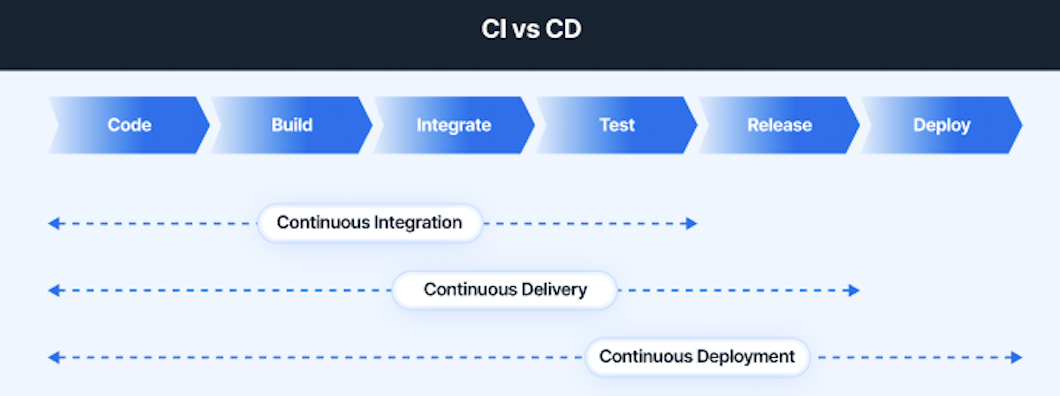
Breaking them apart clarifies how software moves through the pipeline and helps teams adopt the level of automation that matches their release goals.
| Continuous Integration (CI) | Continuous Delivery (CD – Delivery) | Continuous Deployment (CD – Deployment) |
|---|---|---|
| Automates builds and tests for every commit | Automates delivery of tested code to staging | Automates deployment of tested code to production |
| Ensures new code integrates cleanly | Ensures every change is always deploy-ready | Ensures every passing change reaches users |
| Detects integration issues early | Requires manual approval for production releases | No manual approval; releases happen automatically |
| Provides fast feedback to developers | Provides predictable, low-risk deployments | Provides rapid, continuous releases |
| Guarantees a stable codebase | Guarantees a releasable codebase | Guarantees an always-updated production environment |
DevOps Pipeline Architecture
DevOps Pipeline Architecture is the automated framework that connects code integration, testing, and deployment into a single flow. It defines how Continuous Integration (CI) validates every change and how Continuous Delivery or Continuous Deployment (CD) moves those validated changes toward production. Each stage is designed to reduce manual effort, shorten feedback loops, and ensure that software is always in a releasable state.
1. Source Control and Triggering
The pipeline begins in version control. Every commit triggers CI workflows—builds, tests, and quality checks—to validate code early. This automated start ensures that integration issues are caught before they reach delivery or deployment stages.
2. Automated Build Stage
CI compiles the application, resolves dependencies, and generates repeatable artifacts. These artifacts form the input for CD, ensuring that delivery and deployment use consistent, tested outputs rather than manually assembled builds.
3. Test Automation
During CI, automated tests (unit, integration, API, E2E) run to confirm that new changes work reliably with the existing codebase. CD relies on these validated results to decide whether a change is safe to promote into staging or production environments.
4. Artifact Management
Versioned build artifacts allow CI to produce stable outputs that CD can repeatedly deploy across environments. Artifact traceability ensures that the exact same build tested in CI is delivered during CD.
5. Deployment Workflows
This stage is where CD comes into play.
- In Continuous Delivery, deployments to staging are automated, and production releases require a manual approval.
- In Continuous Deployment, every validated change from CI moves directly into production with no manual step.
Deployment orchestration ensures that the handoff from CI to CD is predictable and automated.
6. Infrastructure as Code (IaC)
IaC standardizes environments across CI and CD stages. CI uses it to spin up consistent test environments, while CD uses it to provision stable staging and production environments, reducing configuration drift.
7. Monitoring and Feedback Systems
Feedback loops close the CI/CD cycle. CI benefits from faster insights into build failures or flaky tests, while CD uses monitoring data to validate deployments, detect regressions, and assess release health.
Modern pipelines strengthen CI and CD further by integrating real device testing. Tools like BrowserStack allow teams to test on actual browsers and devices directly within CI workflows and CD stages, helping catch environment-specific bugs before they hit production and ensuring delivery confidence.
Read More: What is the Primary Goal of DevOps?
Conclusion
Once the differences between Continuous Integration, Continuous Delivery, and Continuous Deployment become clear, the entire release process starts to make a lot more sense.
CI gives teams quick feedback and a stable codebase, Delivery keeps every change in a deploy-ready state, and Deployment takes things further by pushing updates straight to production without manual steps. When each stage is understood for what it truly does, teams can fine-tune their pipeline instead of wrestling with one-size-fits-all automation.
Regardless of the differences between CI and CD, the ultimate goal of DevOps is to develop quality software within tight deadlines.
BrowserStack offers various crucial tools for constructing a CI/CD and DevOps-powered testing pipeline. Initially, it offers access to a real device cloud with over 3500+ real browsers and testing devices. Second, it provides a cloud-based Selenium grid with 99% availability, enabling test automation on real browsers and devices.
Useful Resources for CI/CD
Understanding CI/CD
- What is CI/CD? (Differences, Benefits, Tools, Fundamentals)
- CI vs CD: Difference between Continuous Integration and Continuous Delivery?
- How to implement a CI/CD Pipeline?
- How to build an effective CI CD pipeline
- 15 CI/CD Challenges and its Solutions
- Continuous Delivery vs Continuous Deployment: Core Differences
- What is Continuous Testing in DevOps
- Continuous Testing Strategy in DevOps
- Continuous Integration in Agile
- Jenkins Continuous Integration Tutorial
- Difference between CI and CD, Agile and DevOps
- Devops CI: Continuous Integration in DevOps
- How to Build an Azure CI/CD Pipeline?
Tools and Comparisons
- Top 18 Continuous Integration Tools
- Top 15 CI CD Tools for your DevOps project
- Difference between Jenkins vs Gitlab CI
- Jenkins vs Travis: The War of CI Tools
- CircleCI vs Travis CI: Core Differences
- How CI CD Tools have revolutionised Automation Testing?
Best Practices, Tips, and Tricks
- How to optimize test cases for Continuous Integration
- How to run test on GitLab CI Locally
- Role of Automation Testing in CI/CD
- Is CI/CD Integration with Mobile App Testing possible?
- Moving from CI to CD using Automated Visual Regression Testing
- Accelerate CI/CD pipelines with Parallel Testing
- CI/CD Strategies for Faster Application Releases